
Set the app appearance and keep the screen awake
These settings are under More Settings in the canvas and paged note editors. Dark Mode, status bar, and pen box options vary by device. Keep Screen On is an app-wide setting for iPhone and iPad. For a text document’s reading appearance, see Read text and adjust appearance.
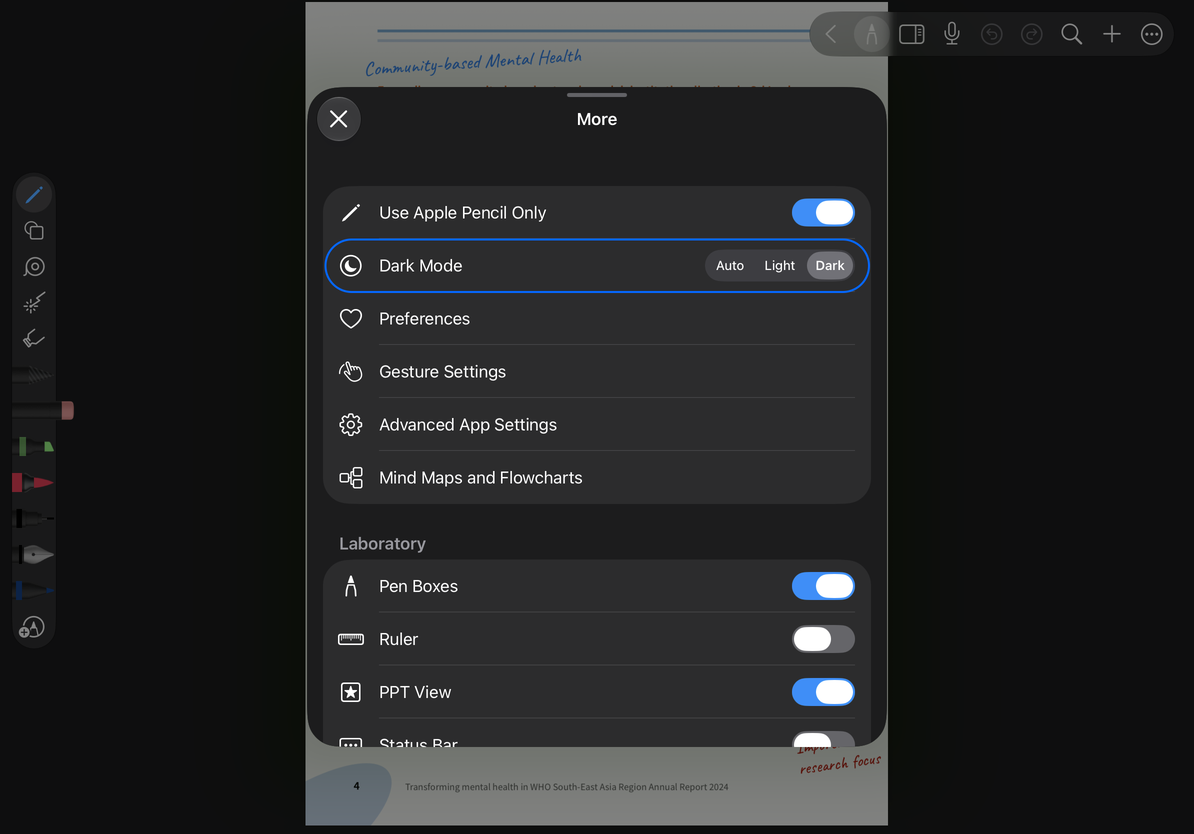
Choose Auto, Light, or Dark
- Open More Settings in an infinite document, vertical document, or paged note.
- Find Dark Mode and choose Auto, Light, or Dark.
- Return to the editor to check the interface and tool panels. Auto follows the system appearance.
- To change the paper color or PDF reading colors, use the document’s background, paper, or reading settings instead.
Mac Catalyst does not show this same Dark Mode option. App appearance and the document background are separate settings.
Choose Auto, Light, or Dark
Show the status bar and pen box
On supported non-Mac interfaces, Status Bar controls whether the status bar is shown. iPad also offers a Pen Boxes switch to show or hide the pen box. iPhone does not have the same visibility option.
To use the pen box after hiding it, return here and turn it on. This is separate from expanding, collapsing, or docking the pen box, and does not delete saved pens or tools.
Keep the screen awake
- Open More Settings → Advanced App Settings.
- On iPhone or iPad, turn on Keep Screen On to prevent normal automatic sleep while the app is running.
- Return to your notes. When you no longer need it, turn the setting off to restore normal automatic sleep behavior.
The preference is remembered on later launches and applies to the app, not just one document. It does not permanently change the device’s lock settings or prevent manual locking. Mac uses the system’s display and sleep controls and does not offer this same switch.
If an option is missing, check your device and editor; an iPad screenshot may show options unavailable elsewhere. See Panel position and presentation if panels cover your content, or Customize the toolbar to reduce the number of toolbar buttons.
This article is current as of October 12, 2026; menus may vary across devices and versions.