
Create and organize sticker collections
Sticker collections are part of Asset Library / Stickers in Infinite documents, Vertical documents, and Paged notes on iPhone, iPad, and Mac. Collect course markers, frequently used icons, or decorative images to reuse across notes.
Create a sticker collection
- Open Asset Library / Stickers from the note's top add menu.
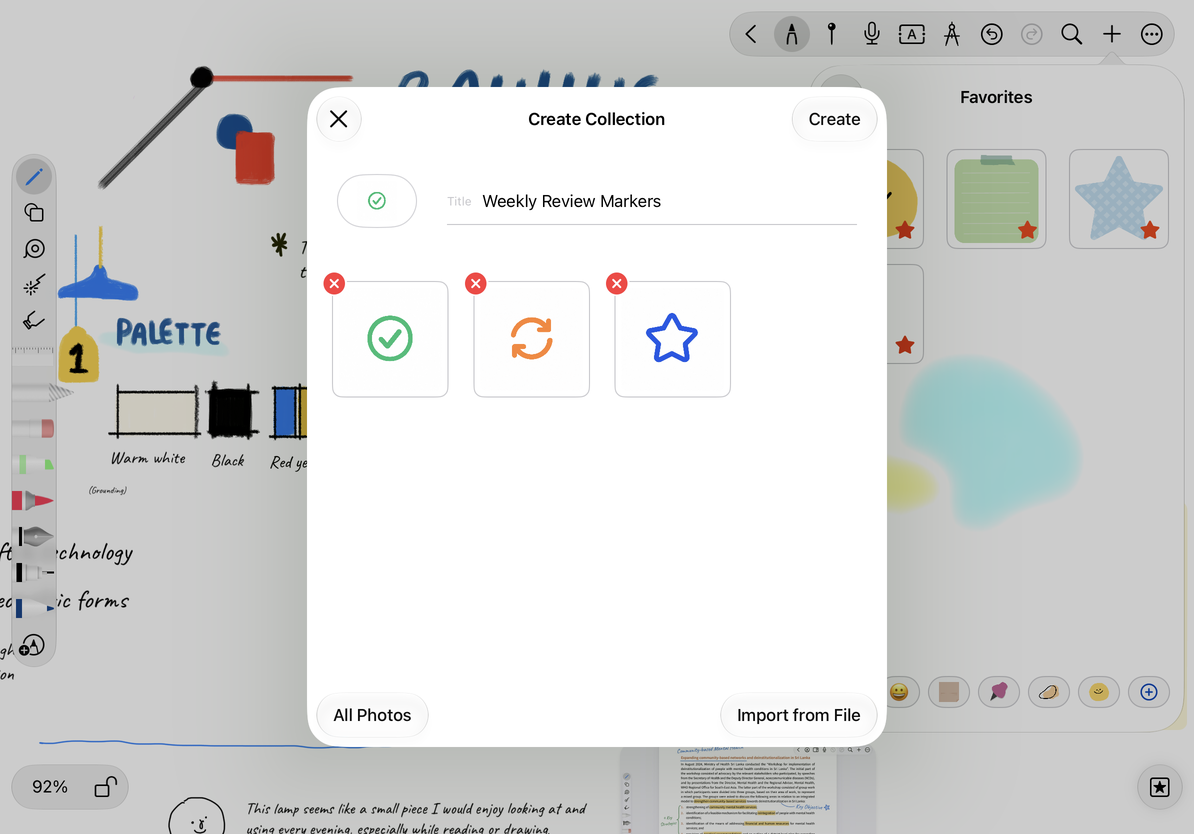
- Use the add option in the collection bar to open Create Collection.
- Enter a recognizable name, such as “Weekly Review Markers.”
- Choose All Photos to add images from Photos, or Import from File to select image files.
- Check the name and thumbnails, then tap Create. The collection appears in the asset library.
If Create is unavailable, check that you have entered a name and added images. You can cancel before creating the collection.
Create a review sticker collection
Edit the name, images, and order
Open your collection's edit option in the asset library. Change the name and tap Done. Add more images from Photos or files, or drag thumbnails to put frequently used items first. Check a thumbnail before deleting an individual sticker, then finish editing.
Managing reusable stickers in the asset library is separate from managing objects already inserted on a canvas. Select the canvas object to change that particular insertion.
Share or delete a collection
While editing an existing collection, open its More menu:
- Share: Packages the collection's images as a ZIP. Choose where to save or send it in the system share sheet. Canceling the sheet leaves the collection intact.
- Delete Collection: Shows a confirmation before removing the collection and its asset entries. Cancel to keep it.
To retain a separate copy of the images, share the collection and confirm that the ZIP was saved before deleting it. This ZIP is an asset package, not a backup of a complete Prodrafts note.
Common questions
Why is there no edit button for this category?
Favorites, emoji, and sticker collections have different controls. Select a collection you created.
How can someone use a shared ZIP?
Check that it contains the image assets. Import support depends on its contents; not every ZIP is a sticker collection.
Related guides: Use the asset library · Export native documents