
Paste or insert Markdown into a document
Available in text documents on iPhone, iPad, and Mac. These actions insert content into the document already open. To create a new document from Markdown, use Markdown import in the library.
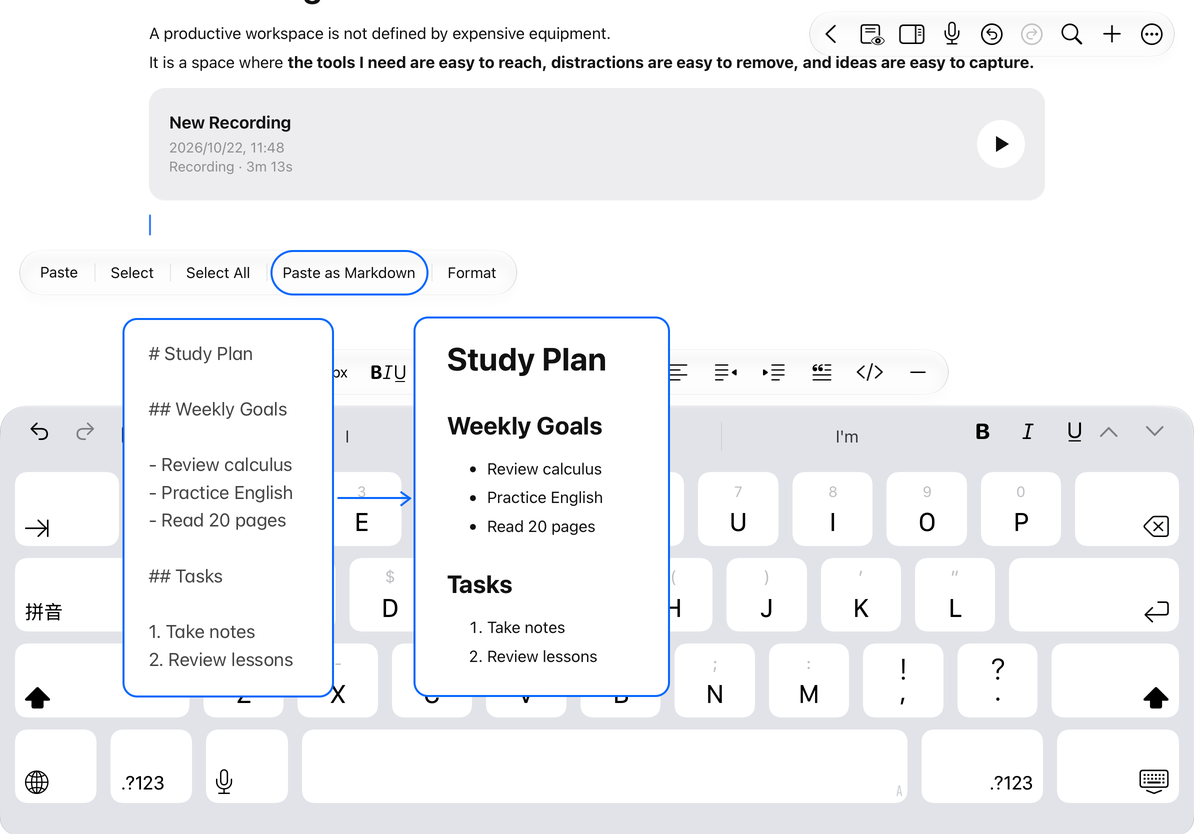
Paste as Markdown
- Copy Markdown text from the source app. The clipboard must contain text, rather than an image or file icon.
- Return to your text document, leave preview mode, and place the cursor where you want to insert it. Clear any selection you do not intend to replace.
- Choose Paste as Markdown from the add menu or text-selection menu.
- Check the converted headings, lists, tables, code blocks, and formulas.
Use Paste as Markdown when you want Markdown syntax converted into document structure. Ordinary Paste serves a different purpose. The action may be hidden or unavailable if the clipboard contains no text.
Paste as Markdown
Insert from a file
- Place the cursor in the document.
- Choose Import Markdown File from the add menu.
- Select a Markdown file in the system file picker.
- Wait for insertion, then check the new content and surrounding paragraphs.
Canceling the picker returns to the original document. If the insertion position or conversion is wrong, undo immediately, then reposition the cursor or correct the source.
You can select one .md or .markdown file at a time. It must use UTF-8 or UTF-16 encoding and be no larger than 10 MiB. If import fails, check that the file is downloaded and meets the size and encoding requirements. Renaming a PDF or Word file does not convert it to Markdown.
Formulas and formatting limits
Supported math delimiters become formulas. Code blocks and escaped dollar signs are not mistaken for math. See Formulas in text documents for syntax and export differences.
Markdown extensions, media paths, and layout vary between editors. Check complex tables, images, links, and code blocks after insertion. Markdown does not preserve a page pixel for pixel, so it cannot guarantee the exact layout of an original webpage or document.
Common questions
Import created a separate document
That is the library import flow. The actions described here are inside an open document.
The Markdown syntax was not converted
Check that you used Paste as Markdown and copied actual Markdown text.
I want to organize the content further
Use headings and the outline and list formatting.