
Insert and edit text links
Available in text documents on iPhone, iPad, and Mac. Links attach to selected text and flow with the paragraph. For freely positioned cards with a title and preview image, use canvas web cards.
Add a link
- Leave preview mode and select the text to display, such as “References”.
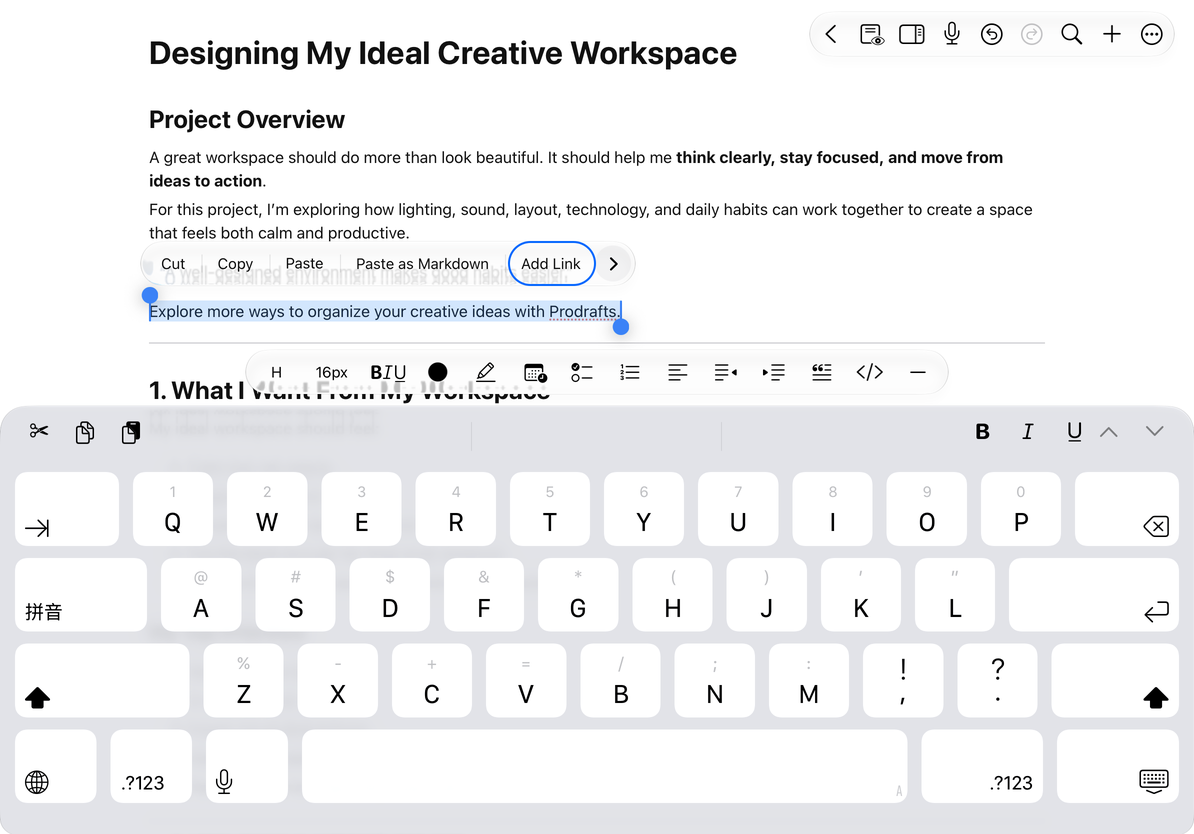
- Open the system editing menu and choose Add Link.
- Enter a web address or paste a Prodrafts internal link. Use a complete
https://address for websites where possible. - Once the address is valid, choose Insert and check the linked text.
Select text first if nothing is selected. Empty or rejected addresses cannot be submitted. A web protocol is added when you enter a plain domain name. Canceling leaves the original text unchanged.
Internal links can target an existing document, page, marker, or canvas object. Copy the link at the destination first, then return to insert it. See Document and location links.
Add a link
Edit, open, and copy a link
While editing, tapping a link normally places the cursor. Select the link or place the cursor within it, then choose Open Link from the editing menu. In preview mode, tap the link directly to open it.
| Action | Result |
|---|---|
| Edit Link | Changes the destination while keeping the displayed text |
| Open Link | Opens the target document or location for internal links; sends websites and other supported links to the system |
| Copy Link | Copies the destination address |
| Remove Link | Removes the link and keeps the text |
You can also remove a link in the link-editing dialog. Edit an incorrect address again, or use Undo immediately after an accidental change.
After following an internal link, use the floating toolbar to return to the source document or go forward. See Go back and forward after a jump. The return history identifies the source document, not a paragraph or cursor position within its text.
Address limits and common questions
Web addresses and other system-supported links need a recognized protocol. Local-file, script, and embedded-data addresses are not used as text links. An accepted address also needs an app on the device that can handle it; acceptance does not guarantee that every third-party deep link will open.
Prodrafts internal links depend on the target document and location remaining available. Sharing the address alone does not transfer the document or make the note public.
Insert is unavailable
Check that the address is not empty and contains no unrelated text.
I only want to copy the displayed words
Use normal Copy. Copy Link copies the destination address.
The webpage is unavailable
Check your connection and the website address. A valid link format does not guarantee that the page still exists.
Related guides: Document and location links, Insert Markdown, Text formatting.