
Set an Infinite or Vertical canvas background
Applies to Infinite and Vertical documents on iPhone, iPad, and Mac. Canvas style controls the reading and writing background for the entire canvas. Some advanced guide line styles and paper textures require Prodrafts Pro. For Paged notes, use paper settings; for Text documents, use page appearance.
Adjust the background color and paper texture
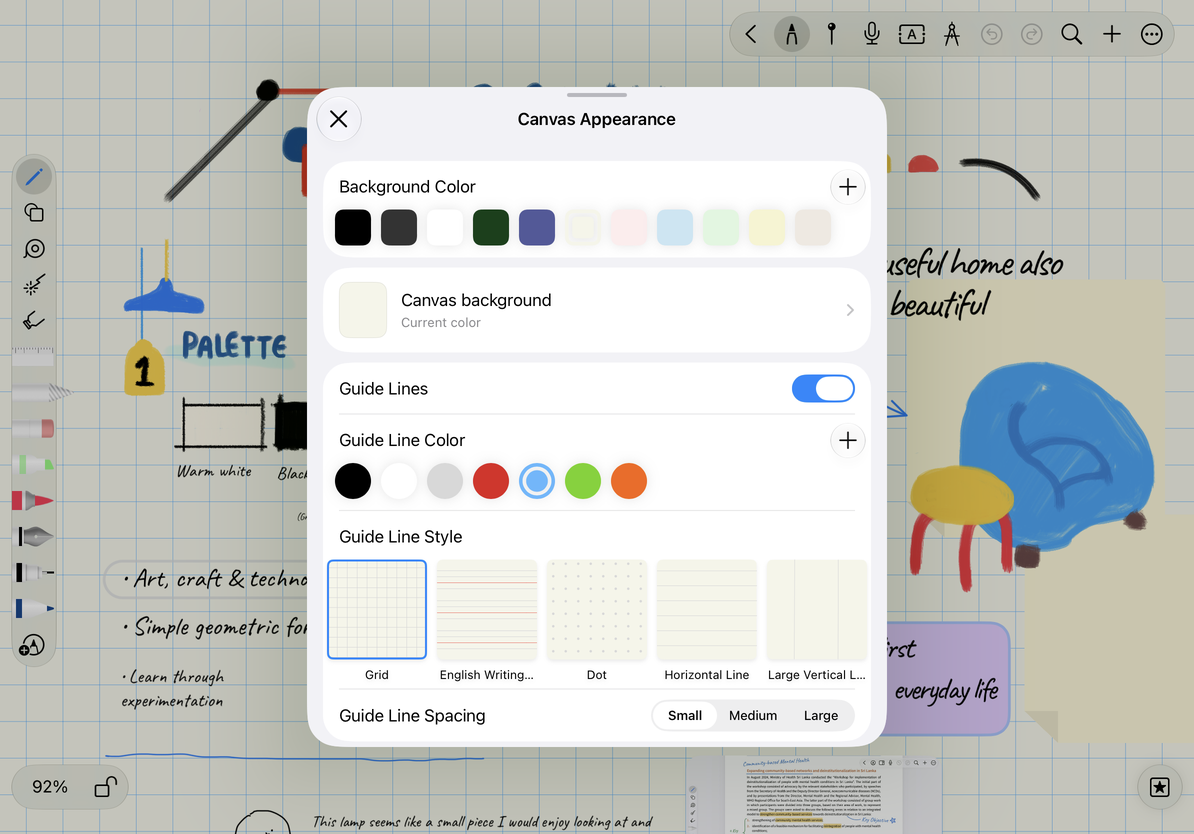
- Open Canvas Styles in the document.
- Choose a Background Color. For less visual distraction, start with a light color and check the contrast with your handwriting.
- Open Canvas Background, browse categories such as Natural, Classic, or Colored Paper, and preview a texture.
- Return to the canvas and check the result, especially whether pale strokes remain readable.
If a style shows a lock or Pro prompt, follow the prompt to choose an available style. To change back, reopen the same panel and select the previous color or texture. Closing the panel does not delete canvas content.
Choose guide lines
Turn on Guide Lines, then choose a Guide Line Style: grid, English handwriting paper, dots, horizontal lines, large vertical lines, music staff, dashed grid, or divided paper. Adjust Guide Line Color and Guide Line Spacing afterward.
Horizontal lines help with continuous writing; grids and dots help arrange diagrams. Music staff is for notation. Divided paper provides larger sections with an adjustable page ratio for organizing content into fixed areas. It remains a background pattern on an Infinite or Vertical canvas; it does not create the page numbers or page order of a Paged note.
Select auxiliary lines
Common questions
Why can't I erase the guide lines?
They are part of the background. Turn off Guide Lines to hide them.
Can background lines automatically align objects?
The background is a visual reference. Object alignment guides and the ruler for drawing straight lines are separate tools.
My content is hard to read after changing the texture
Try a background with more contrast, lighter guide lines, or no texture.
Whether the background appears in an export depends on the export options. A Vertical document keeps its horizontal width limits; changing its background does not turn it into an Infinite document.