
Set gestures and prevent accidental touches
Applies to Infinite documents, Vertical documents, and Paged notes. Touch gestures aren't the same as the text editor's text selection gestures; Mac's menus don't include the same set of two-finger undo settings.
View accidental touch prevention while writing
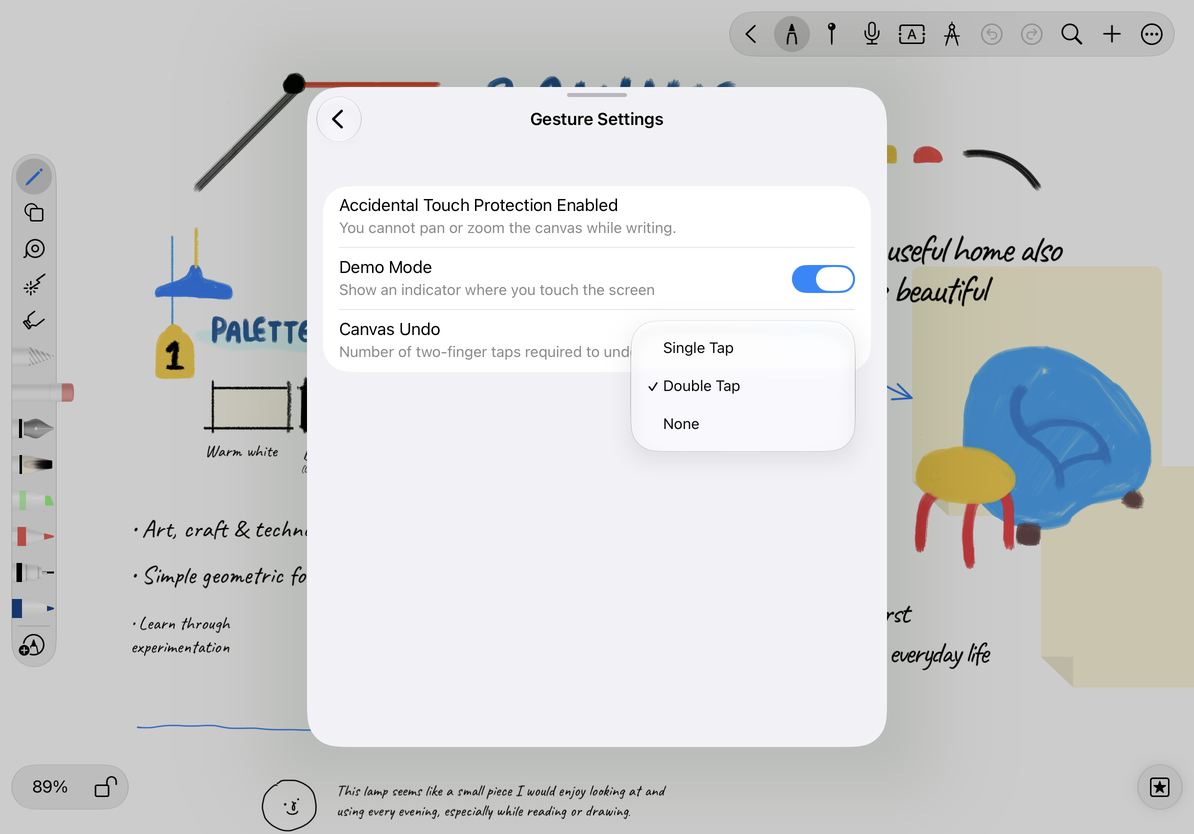
Open More → Gesture Settings. On touch devices, Accidental Touch Protection Enabled in the panel indicates that swiping or zooming the canvas is not allowed while writing. This is a description of the current behavior; if the row doesn't have a switch, there's no need to tap the text to find how to switch it off.
To pan the canvas, end the stroke before moving or zooming. Anti-accidental touch does not mean that all attachments are locked; whether the object can be moved is still determined by the editing status and object lock.
Set up two-finger undo
- Open More → Gesture Settings.
- Find Canvas Undo.
- Select Single Tap, Double Tap, or None. The number of times here refers to the number of times two fingers tap together.
- Return to the canvas and write a small stroke, testing the undo in the chosen way. After selecting None, use the toolbar's Undo button instead.
Choose the undo gesture that suits you
Undo and redo
Undo reverses the latest undoable edit; Redo restores the action you just undid. Finish the current stroke or transformation before using these toolbar buttons, then check the result. An unavailable button means there is no corresponding action in the current editing history. Repeated tapping does not create recovery history.
If two-finger taps are often confused with navigation actions, you can change Undo to "Double Tap" or "None". If you just want your fingers to take care of navigation, you can use Apple Pencil only on a supported iPad.
Why can't my Mac find the count option?
Touch devices have different gesture settings than Macs, which have toolbars and keyboard shortcuts where applicable.
Can content be undone after being deleted by mistake?
Supported operations in the current editing history can be undone; see the relevant recovery guide for permanent document deletion or recovery after leaving a document.
Related guides: Pencil and Input Methods · External Keyboard Shortcuts · Object Lock