
Reorder, copy, and paste pages
These actions apply to Paged notes and imported PDFs on iPhone, iPad, and Mac. Page operations affect whole pages. Copying with the Lasso handles only the selected content within a page.
Select multiple pages and reorder them
- Open the thumbnail sidebar and choose All Pages.
- For batch actions, enter thumbnail edit mode and select pages. You can Select All or Deselect All. Leave edit mode when finished.
- To reorder, stay in All Pages outside thumbnail edit mode. Drag a thumbnail to the intended position, check the insertion indicator, and release.
- Check the new page numbers and neighboring content. A locked document cannot be reordered by dragging.
Bookmarks and marked pages are filtered lists. Return to All Pages before arranging the complete sequence. Reordering changes page numbers, so check positions in the thumbnails afterward.
Copy one or more pages
For one page, choose Copy Page in its thumbnail menu or the current page's More menu. For several, enter thumbnail edit mode, select them, and copy. Multiple pages are copied in document order, not the order you selected them.
Copy Page uses Prodrafts' page content format. Copying an ordinary image or text does not provide the same Paste Page action.
Copy one or more pages
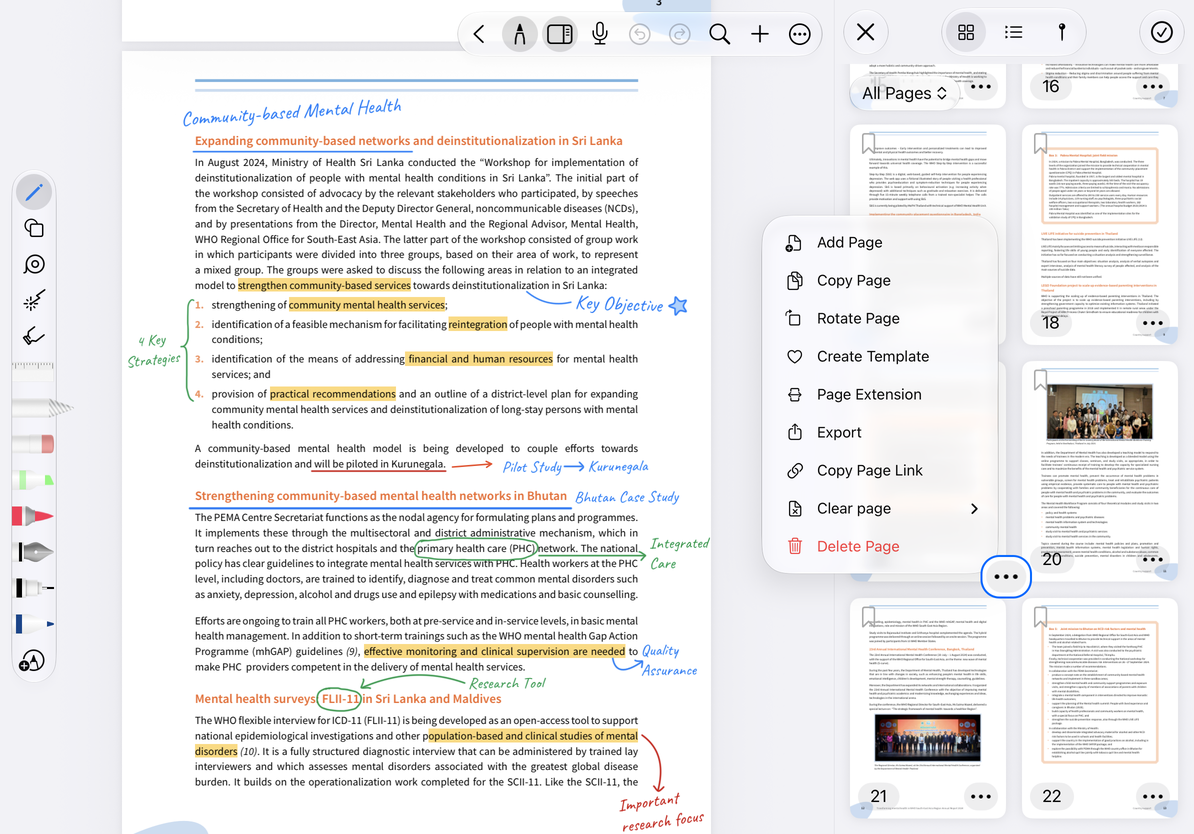
Paste pages
- After copying, go to the destination page and open its thumbnail menu or the Add Page panel.
- Paste Page appears when the clipboard contains usable Prodrafts pages.
- Choose the available position—before, after, or at the end—and paste.
- Check the added page count, order, and content. After pasting into another document, also inspect images, annotations, recordings, and other content on each page.
You can close the panel while checking the destination. No copy is created until you paste. If you paste by mistake, use Undo, or identify the added pages carefully and delete them.
Common questions
Paste Page is missing
Check that you used Copy Page and switched back to All Pages. Another copy action may have replaced the clipboard content.
I only need the blank paper again
Use the current template or a saved template.
Can I drag a page into another app?
The other app may receive a page image. That does not mean it retains Prodrafts' editable page structure.