
Zoom, jump to pages, and use thumbnails
These controls apply to Paged notes and imported PDFs on iPhone, iPad, and Mac. Use page numbers when you know the destination, thumbnails to recognize it visually, and bookmarks for pages you visit often.
Zoom a page
Use the plus and minus zoom buttons, or pinch on a touch device. When the size is comfortable, tap the lock button to keep that zoom level. Unlock before adjusting it again. Paged note zoom lock is separate from the direction lock on an Infinite canvas.
Zoom lock prevents accidental changes while reading. It does not lock page objects or stop other people from opening the document.
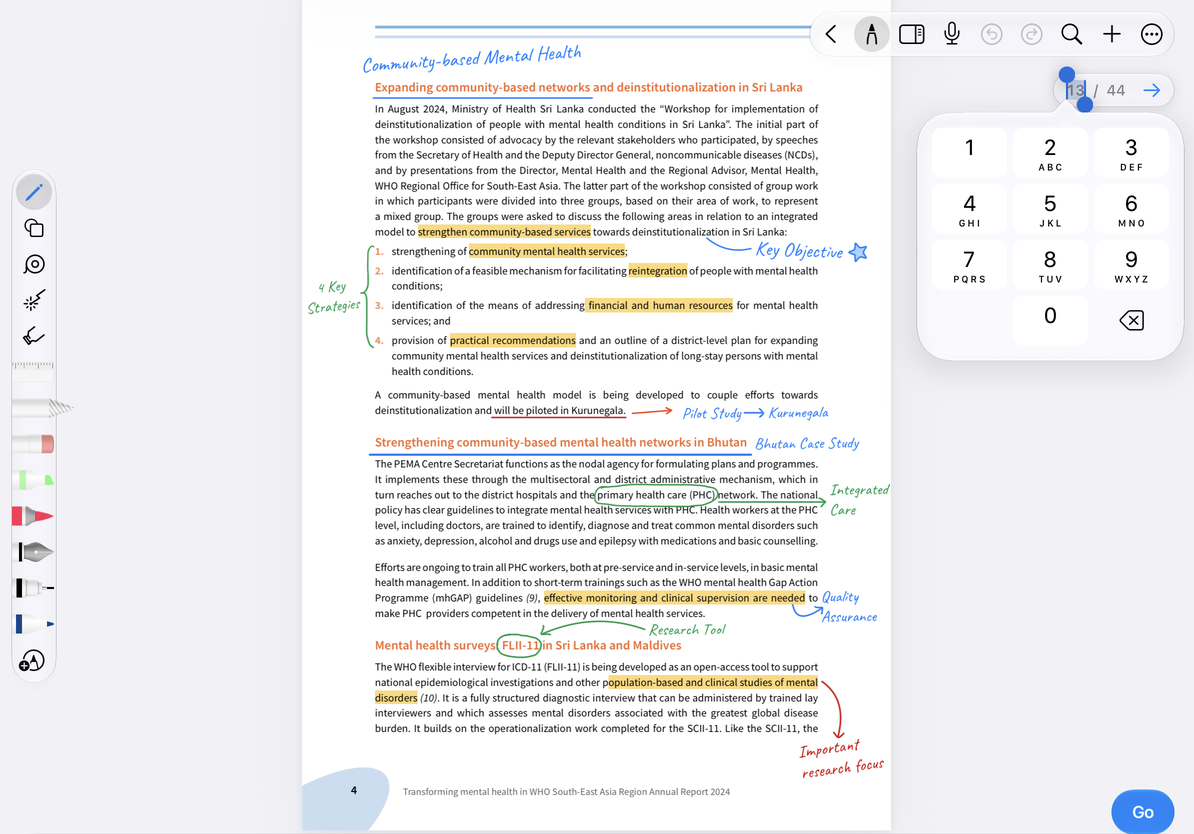
Jump to a page number
- Tap the current number in the page indicator.
- Enter a number from 1 to the document's total page count.
- Tap the arrow that appears, or confirm with the keyboard.
- Check the page and its content. An invalid number does not create a new page; enter a valid number instead.
You can also use Go to Page in More. These numbers follow the document's internal order, which may differ from numbers printed in the PDF—for example, if a cover and contents pages come first.
Jump to a page number
Use thumbnails and bookmarks
Open the thumbnail sidebar from the top toolbar and tap a thumbnail to go to that page. Switch among all pages, bookmarked pages, and marked pages:
- All Pages shows the complete order and page count.
- The bookmark filter shows pages you bookmarked.
- The marked-page filter helps find pages you have annotated.
Tap the bookmark button on a thumbnail to add a bookmark; tap again to remove it. Use the bookmark filter to check the result. Removing a bookmark keeps the page and its handwriting. If a filtered list is empty, return to All Pages before assuming pages are missing.
Common questions
I want to open this page from another note
Open the page and choose More → Share → Copy Link to This Page, then add the link to your index note. It follows the same page after reordering. If that page is deleted, the old link can no longer locate it. See Document and location links for setup and return navigation.
The page number is higher than the printed number
Use the document's internal order, or add a page outline for chapters.
I cannot reorder or paste pages
Switch to All Pages, then see Organize pages.
I only want to mark one spot on a page
Use a pin.