
Create a Text document from Markdown
Importing a .md or .markdown file creates a new Text document with paragraphs and content blocks. The free document creation limit may apply.
For example, you can export meeting notes from another writing app as Markdown, then import them into Prodrafts to continue editing. To add a few paragraphs to an open document, use Paste or insert Markdown into the current document instead.
Create a new Text document
- Export a Markdown file from the original app. Check that its extension is
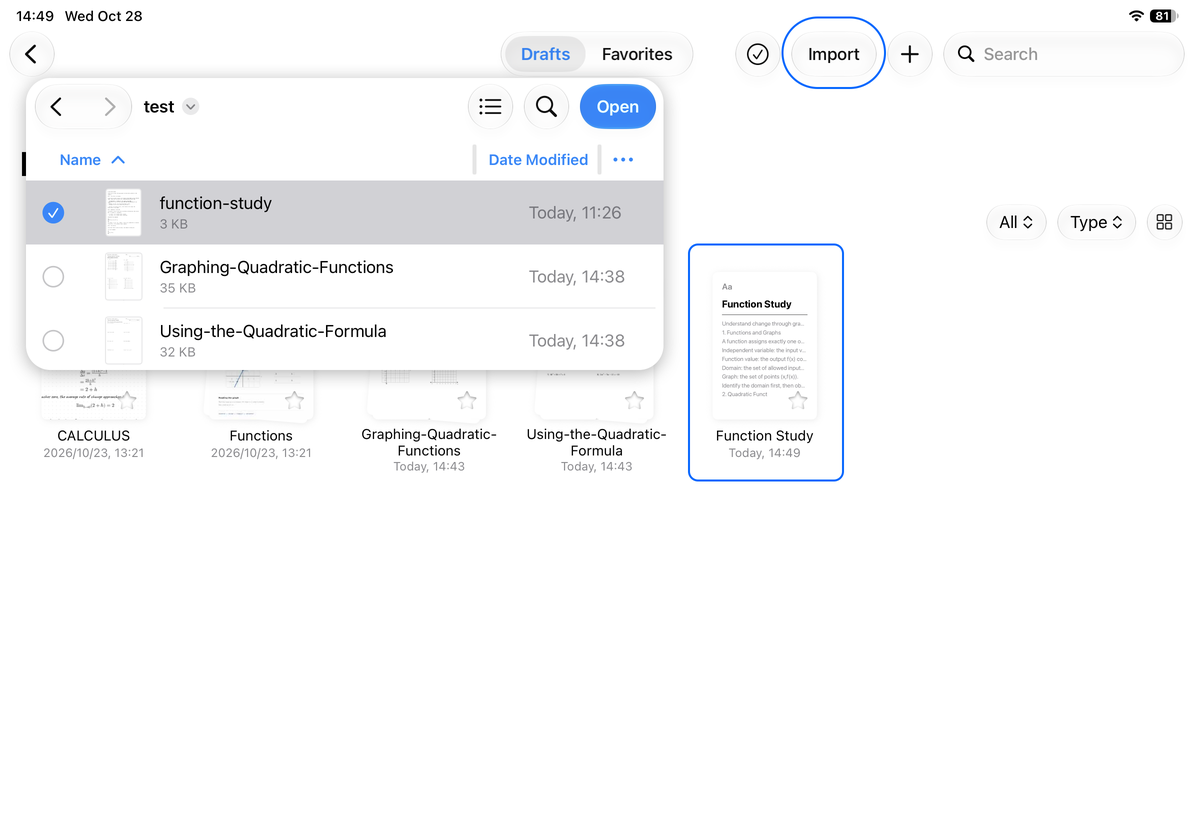
.mdor.markdown, then save it somewhere accessible in Files. - In the Prodrafts library, open the destination folder and choose Import.
- Select the file in the system file picker, confirm, and wait for conversion. You can also share it from another app to Prodrafts, set its name and destination in the import panel, then tap Import.
- Open the new Text document. Check its title, paragraphs, heading levels, lists, tables, and code blocks.
- Tap the body text to continue editing. When finished, return to the library and check the document's name and folder.
Create a new Text document
Check formulas and media separately
Supported formula delimiters include $…$ and \(…\) for inline formulas, and $$…$$ and \[…\] for block formulas. Code blocks, inline code, and escaped dollar signs remain literal text. After importing, tap a formula to inspect it and make any corrections in the formula editor.
A Markdown file may contain image links while the image files remain in another folder or online. Check each image after importing. If one is missing, keep the original material and insert an accessible copy into the document. A single .md file does not necessarily include its attachments.
Markdown may not reproduce all formatting from the original app. Check custom plugin blocks, complex tables, and custom styles individually, and simplify them to standard document content if needed.
If the result is not what you expected
If the import creates a Paged note instead of a Text document, check the file's actual format and extension. Make sure you did not select a PDF or DOCX by mistake. If text is garbled or conversion fails, open the source in its original app, export Markdown again, and retry.
To keep a complete document and its attachments for reimporting, use Native Prodrafts export. To use the content in other writing apps, see Export and print Text documents.
Last checked: October 12, 2026. Menus may vary by device and version.