
Browse and filter attachments
The attachment list is available in Infinite and Vertical documents on iPhone, iPad, and Mac. It brings together attachments from the current document, rather than searching the whole library. For Paged notes, find objects on their pages. For Text documents, use the body media controls.
Open the attachment list
- Open an Infinite or Vertical document.
- Open the editor's More menu and choose Attachment.
- Choose All to browse the document's attachments, or select a specific type.
- Find and preview the item. To edit it, return to the canvas and select the corresponding object.
Open the attachment list
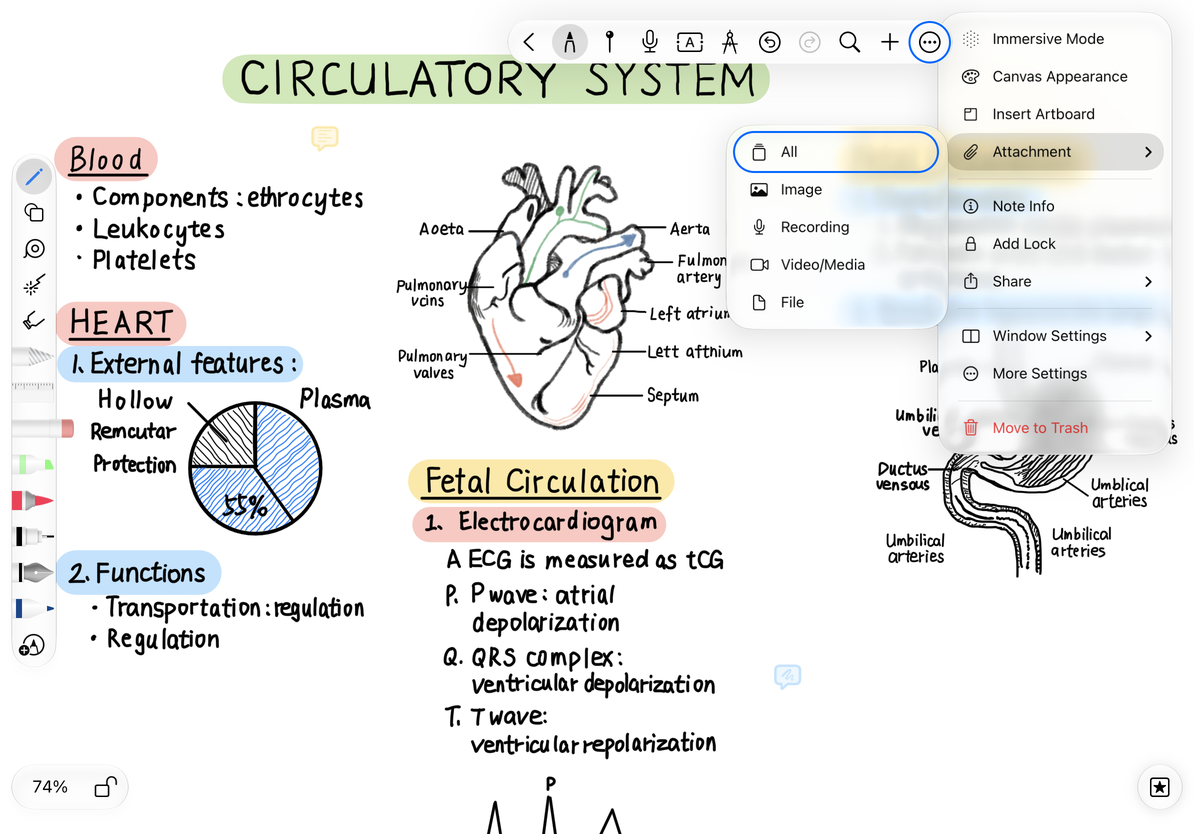
Choose a category
| Category | What to look for |
|---|---|
| All | All attachments available to preview |
| Image | Photos, scans, and other images |
| Recording | Saved audio; use the recording list for management |
| Video/Media | Playable media attachments |
| File | PDFs and other file objects |
Filtering changes only what is shown. It does not delete other attachment types. Close the preview and reopen Attachment to choose another category.
Work with the attachment
To adjust an image, see Crop and remove backgrounds. To expand a PDF onto an Infinite or Vertical canvas, see Convert PDF pages to images. Use the recording list to search, rename, share, or delete recordings; attachment previews do not replace those controls.
Common questions
The list is empty, but the canvas has text
Text boxes and handwriting are not media attachments in this list. Use canvas search.
An attachment is missing
Check that you opened the document containing it, then choose All.
I cannot find this overview in a Paged note
This attachment list is for Infinite and Vertical documents. In a Paged note, use the page objects or thumbnails to locate content.
Closing an attachment preview leaves the attachment in the note. To delete it, use the object's menu on the canvas and check its name and location first.