
Recall knowledge with flashcards
Flashcards work well for terms, definitions, historical events, concept comparisons, and short questions. Try to recall the answer before turning the card over to see where you get stuck.
Turn key concepts into flashcards
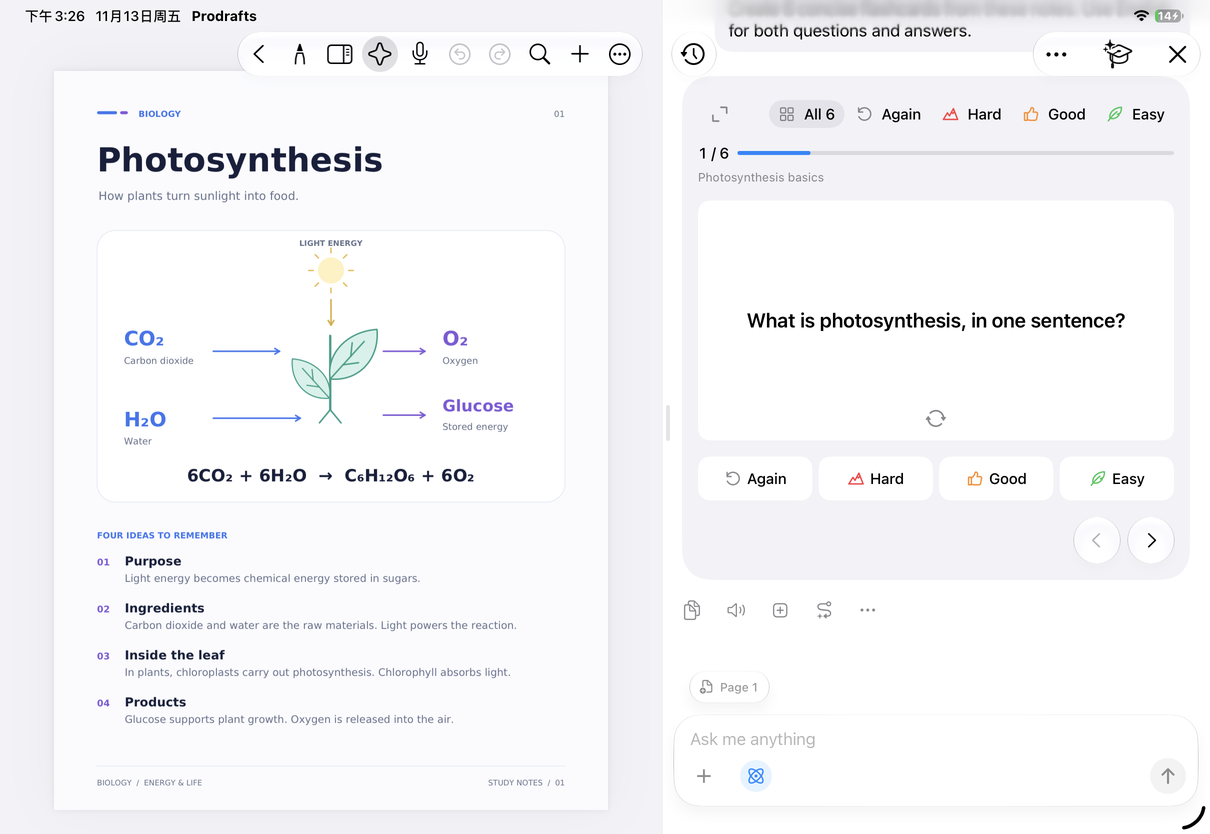
Generate flashcards from notes
- Reference your study material in AI chat, or enter a topic and key concepts.
- Choose + → Learn → Flashcards.
- Specify what belongs on the front and back, then send.
Turn this page's key concepts into flashcards. Put a recall question on the front and a concise answer on the back. Test only one point per card.
You can also tap + in Learn's Flashcards category to return to chat and prepare material and instructions. Generated cards join the current note's exercise list.
Flip and rate
Tap the card or the flip icon below to reveal the back; tap again for the front. Rate your recall using four levels:
| Rating | When to choose it |
|---|---|
| Again | You could not recall it and need another look |
| Hard | You remembered part of it but needed a hint or more time |
| Good | You recalled it correctly with a slight pause |
| Easy | You recalled it smoothly and accurately |
This website demo makes no AI requests and saves nothing to your notes. In the app, exercises are generated from material you provide.
Choosing a rating reveals the back, records the rating, and then automatically moves to the next card. While waiting, you can change it, navigate manually, or switch filters. With the system's Reduce Motion enabled, cards switch directly instead of using a flip animation.
Review by recall level
Choose All / Again / Hard / Good / Easy above the cards. Filters show matching ratings while retaining original card numbers. If a category is empty, return to All.
After every card has a rating, the completion page shows each category's count. Review one category or restart the full set. Use Return to unrated cards for any you missed.
A card's rating and a whole set's Mastered marker are separate. Ratings filter the current attempt; you manually organize sets by mastery. The app does not currently schedule future review dates from these ratings.
Common questions
Generated cards are too long
Narrow the source and ask for one question per card with an answer of at most two sentences. Regenerating creates new exercise content.
I accidentally chose Easy when I could not recall the answer
Return to the card and change its rating. Honest self-assessment makes review more useful.
Can I continue from the same position next time?
On the same device, open the original conversation or the note's Learn list to continue saved progress. See Manage exercises.